

Most sensor deployments don't fail because of the hardware. They fail because the decision about what data to collect comes after the sensor has already been ordered.
The result: organisations end up with accurate presence data for spaces they don't need to monitor in real time, and no data at all for the decisions that actually matter — like whether a floor is being used enough to justify the lease, or whether meeting rooms are the right size for how teams actually meet.
This guide starts from the decision, not the catalog.

Start with the question, not the sensor type
Occupancy sensors answer four distinct data questions. Each maps to a different sensor category, cost level, and deployment approach. Defining which question matters most to your organisation is the decision that makes everything else easier.
"Is this space in use right now?"
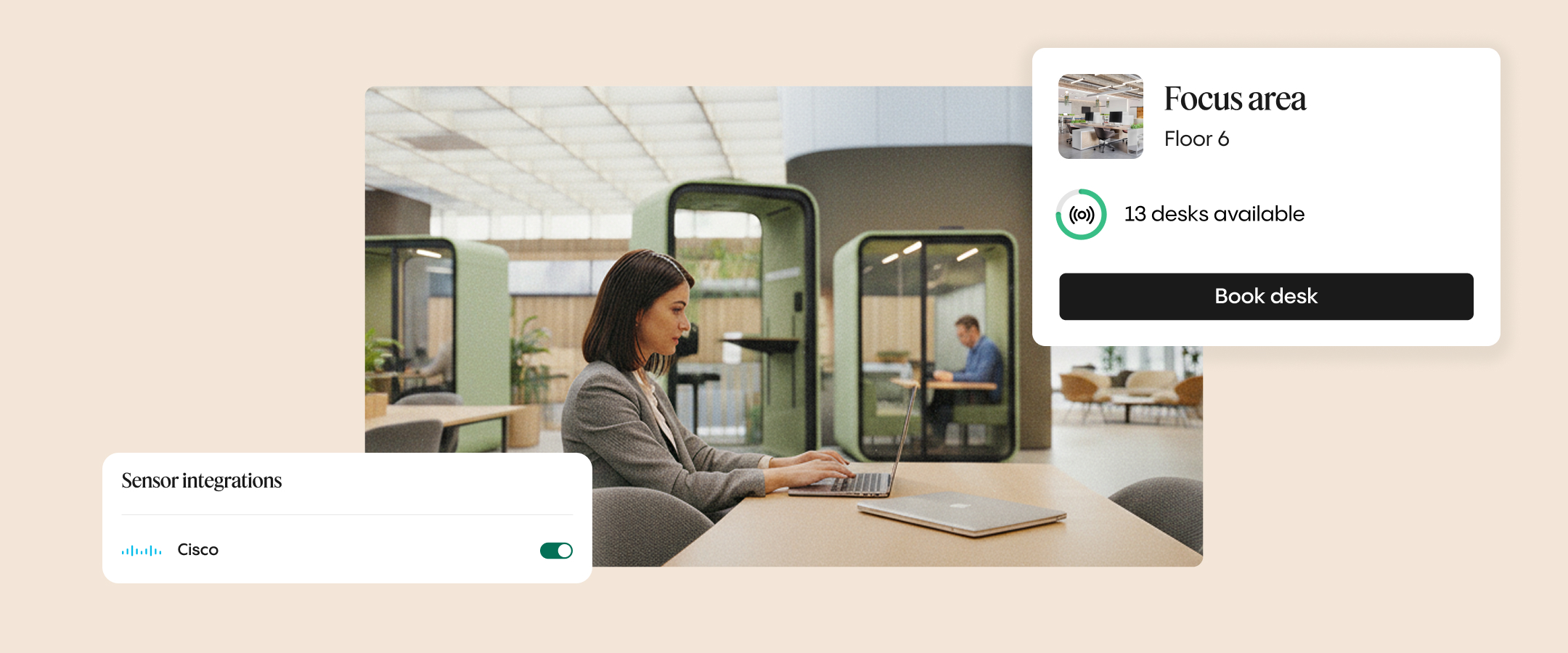
The most common question in a hybrid office. Relevant for live desk and room availability displays, automated release when a booking goes unused, and validating whether employees are actually showing up for their reservations. Any binary presence sensor answers this.
"How many people are in this space?"
A higher-precision question. Relevant for meeting room rightsizing, floor-level density planning, and building entry and exit analysis. You need a people-counting sensor to answer this accurately — not just a presence signal.
"How is this space being used over time?"
A planning question rather than an operational one. Feeds space strategy decisions: which areas are underused, which floors could be consolidated, whether your current desk-to-employee ratio still fits your hybrid policy. Any sensor type generates this data when connected to an analytics platform.
"Is the environment comfortable enough to work in?"
CO2 levels, temperature, humidity, air quality. These are environmental sensors rather than occupancy sensors — they do not measure space usage directly, but they complement occupancy data and matter for wellbeing compliance and HVAC optimisation.
Most corporate offices need sensors that answer questions 1 and 3. Question 2 is the upgrade investment when lease-level decisions are on the table. Question 4 is supplementary.
Sensor types and where they work
PIR sensors (passive infrared)
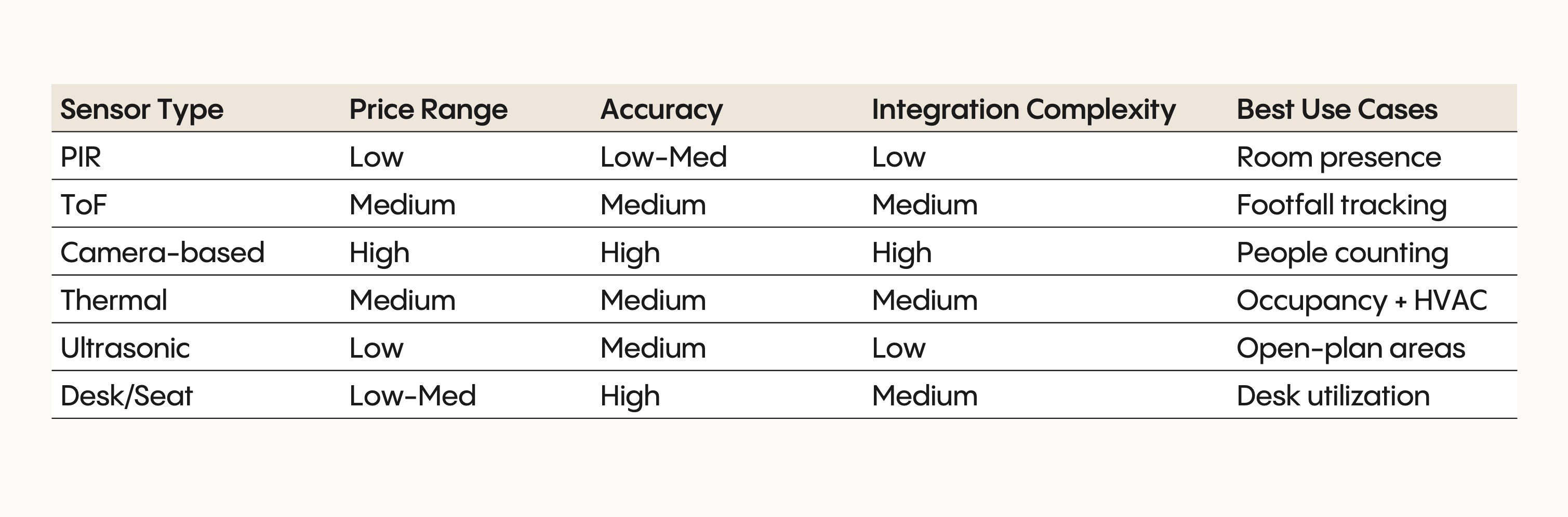
Detect motion through heat signatures. Binary occupied or vacant signal — no headcount, no duration tracking. Work well in enclosed spaces: individual offices, small meeting rooms, toilet facilities.
Where they fall short: someone sitting still may trigger a vacant reading, which creates false availability signals in hot-desking environments. Not suited to open-plan areas.
Cost: low (€30–€80 per unit)
Ultrasonic sensors
Sound-wave based, with wider coverage than PIR. Can detect movement behind partitions and around obstacles, which makes them more suitable for irregularly shaped spaces. Still binary — no headcount.
Where they fall short: HVAC turbulence, background noise, and open ceilings can affect accuracy. Like PIR, they cannot count people.
Cost: low to medium (€40–€100 per unit)
Wireless desk sensors
Placed under or on individual workstations to detect whether a specific desk is occupied. The standard choice for hot-desking and activity-based working environments. Enable real-time availability displays and automate no-show release at the desk level.
Where they fall short: at scale, battery maintenance becomes a significant operational burden. An office with 500 desks requires managing 500 replacement cycles, plus firmware updates and sensor health checks.
Cost: low to medium (€50–€150 per unit)
Time-of-flight sensors
Time-of-flight sensors use infrared light to measure distance and count people passing through a defined area. They count without capturing any identifying information, making them a privacy-friendly option for entrances, corridors, and meeting room headcount.
Where they fall short: accuracy depends on mounting height and field of view. More expensive than PIR, less detailed than camera-based systems.
Cost: medium (€100–€200 per unit)
Camera-based sensors
Use computer vision to count people, detect activity, and track movement. Process video locally — no images leave the sensor, only data points. The highest accuracy of any sensor type for people counts and space patterns.
Where they fall short: privacy concerns are real even with aggregated output. Optical sensors generate employee anxiety regardless of what data they actually transmit. Ceiling mounting often requires new ethernet cabling. Highest upfront cost of any category.
Cost: high (€300–€500+ per unit, plus software licensing)
Thermal sensors
Detect heat signatures without visual capture. Privacy-friendly alternative to cameras for people counting. Useful paired with HVAC systems for demand-driven heating and cooling based on actual occupancy rather than scheduled use.
Where they fall short: false positives from laptops, projectors, and sunlight through windows are a recurring issue.
Cost: medium (€150–€300 per unit)
What sensors actually cost — and what they return
Hardware price is the easiest number to get. The costs that surprise organisations are the ones that compound after deployment.
The costs that add up
Installation for battery-powered sensors is straightforward. Power over Ethernet sensors require ceiling access and cabling — costs that often exceed the hardware price for large deployments. Software licences are typically charged per sensor per month: at €5 per sensor across 500 desks, that is €30,000 annually before a single battery is replaced.
Battery replacement schedules, sensor health monitoring, firmware updates, and recalibration all add operational overhead at scale. Calculating a five-year total cost of ownership before committing to a vendor is not optional — it is the most important figure in the procurement decision.
The return
The business case for occupancy sensors is well-established across documented deployments. Typical payback periods run 3 to 6 months, with three-year ROI figures of 500 to 1,500%. Ghost meetings alone waste an estimated 30 to 40% of meeting room capacity in most offices — recovering that capacity through automated no-show release is one of the fastest routes to measurable return.
At the real estate level, sensor-informed consolidation decisions can be significant. Occupancy data that shows consistent underuse of a floor or building creates the evidence base for lease renegotiation or subletting that organisations rarely have without it.
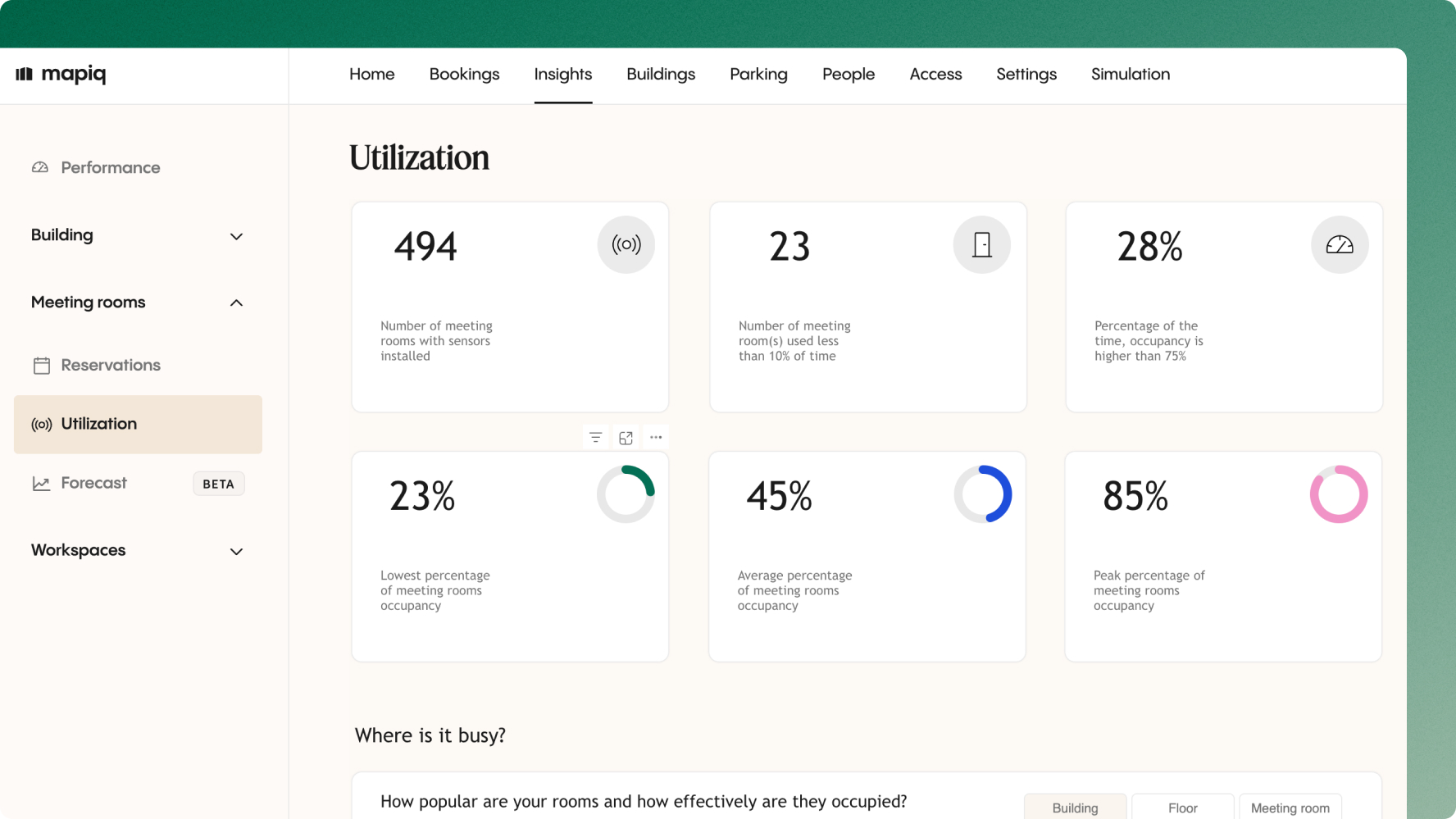
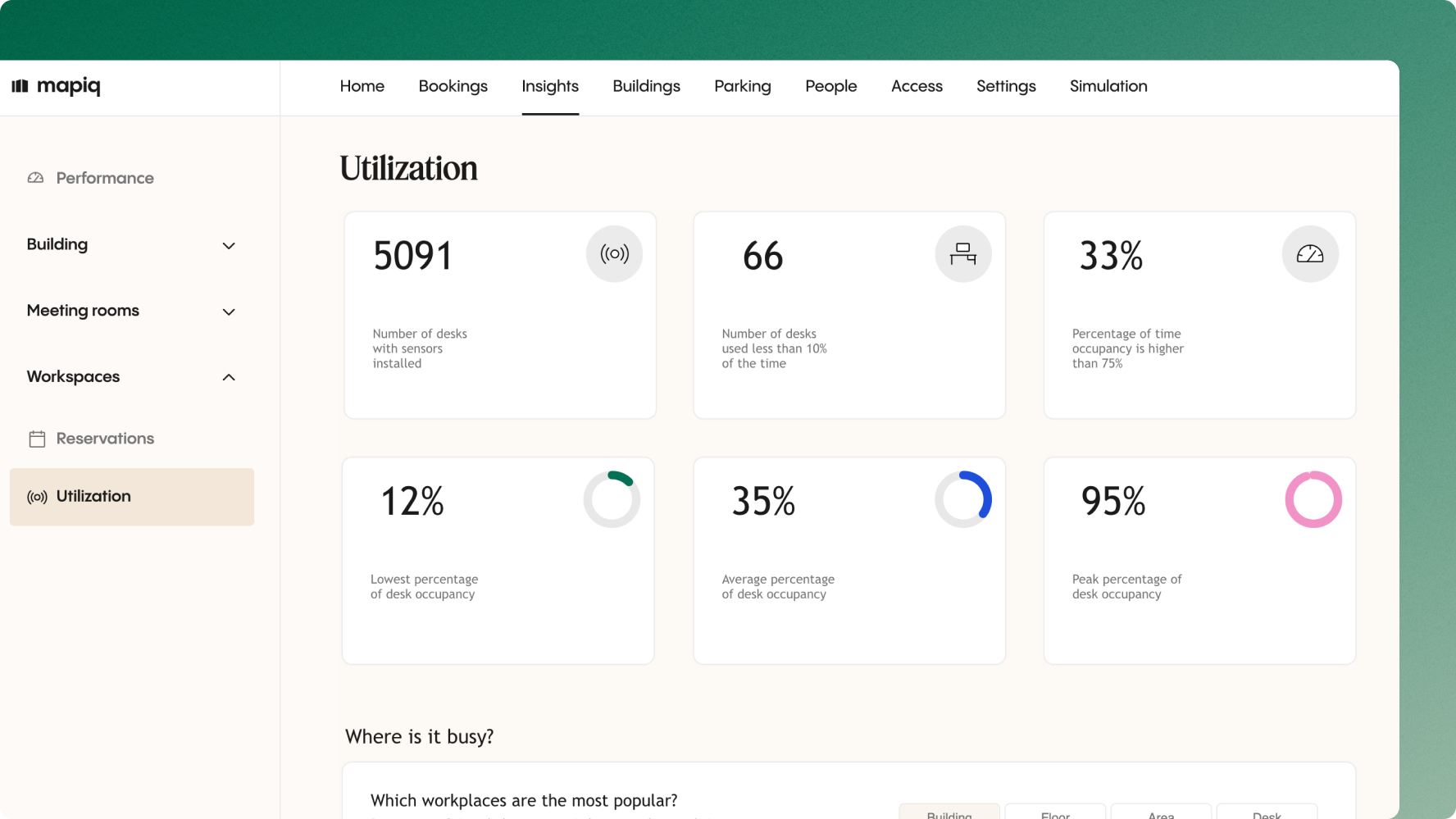
A workplace occupancy platform that combines sensor data with booking records and badge data gives workplace teams the complete picture — not just whether a room was reserved, but whether it was actually used, by how many people, and for how long.
The integration question no one asks early enough
Hardware decisions are visible. Integration decisions are invisible until they block everything.
Open versus closed ecosystems
Some sensor vendors lock data behind proprietary dashboards. This works for a single sensor type in a single building. It breaks down when you have multiple sensor types, multiple buildings, or a need to combine sensor data with booking records, badge data, or Wi-Fi attendance patterns.
A sensor-agnostic platform that accepts data from multiple sensor types through open APIs gives you the freedom to choose the best hardware for each use case. It also protects the data investment as sensor technology changes — hardware can be swapped without rebuilding the analytics layer.
Real-time versus batch data
For live desk and room availability displays, real-time data is essential — a delay of more than a few minutes makes the display misleading. For space planning, utilisation trending, and lease decisions, batch data updated hourly or daily is sufficient and often cheaper to operate.
Define which use cases require real-time before selecting sensors. Not all of them do, and real-time transmission at scale increases infrastructure and cost requirements significantly.
IT approvals
Sensors connect to corporate networks. That means security reviews, GDPR compliance documentation, and data access governance — all of which take time. Projects that involve IT at the procurement stage move faster than those that encounter security reviews after installation.
How to start without overcommitting
The most common deployment mistake is trying to answer all four questions at once, across the entire building, before validating that the data quality is good enough to act on.
A more reliable approach: pick the one question that would most immediately change a decision you are already trying to make. Pilot it on a single floor or space type — one floor of desks, or the meeting rooms on one floor. Measure whether the data actually changes how you manage that space before expanding.
The metric that matters in a pilot is not sensor uptime. It is whether the data is producing decisions that would not have been made without it.
Common mistakes in occupancy sensor deployments
- Choosing the sensor before defining the question. The most expensive version of this is deploying high-accuracy camera-based sensors for spaces that only needed a binary occupied or vacant signal. The gap between what the data provides and what the organisation actually uses rarely closes over time.
- Underestimating ongoing costs. Hardware is the visible cost in year one. Software subscriptions, battery replacement cycles, and maintenance overhead are what determine whether the programme is operationally sustainable at scale.
- Not involving IT at procurement. Security reviews that happen after installation can stall live systems. IT needs to be part of the vendor decision, not the post-installation review.
- Skipping employee communication on privacy. Even sensors that transmit only aggregated data points can generate anxiety when employees do not understand what is being monitored. Clear communication before deployment — not after — protects both adoption and trust.
- Scaling before validating data quality. Sensor data that looks plausible but contains systematic errors produces confident but wrong decisions. Validate accuracy in the pilot before committing to an enterprise rollout.

.jpg)
